A stable surgical image begins with color that can be trusted. White balance helps the camera render tissue, blood, and instruments consistently under the operating room’s illumination. Small shifts matter. A cool cast can make tissue appear unnaturally pale, while a warm cast may distort reds. The effect is subtle, but it can influence how clearly the team interprets the image.
The scale of surgical imaging makes dependable setup important. A landmark analysis by Weiser et al. in The Lancet estimated 234.2 million operations worldwide in 2004; this is a historical estimate, not a current annual count. For technical context, IEC 60601-2-18 addresses safety and essential performance for endoscopic equipment, while CIE 15:2018 provides a recognized framework for colorimetry. Neither standard supplies one universal white-balance procedure for every camera. That distinction matters.
This guide answers the practical question, “How to calibrate white balance on a surgical camera system?” It focuses on a clean, neutral reference, consistent illumination, and the camera manufacturer’s instructions. The operator should let the system stabilize, place the reference in the same light as the surgical field, and check the result on the intended monitor. A white card under different lighting may mislead. So can a quick visual judgment. Calibration should be repeated after changes to the light source, scope, or camera settings, with the final image reviewed by qualified clinical and technical staff. No preset can replace that check.
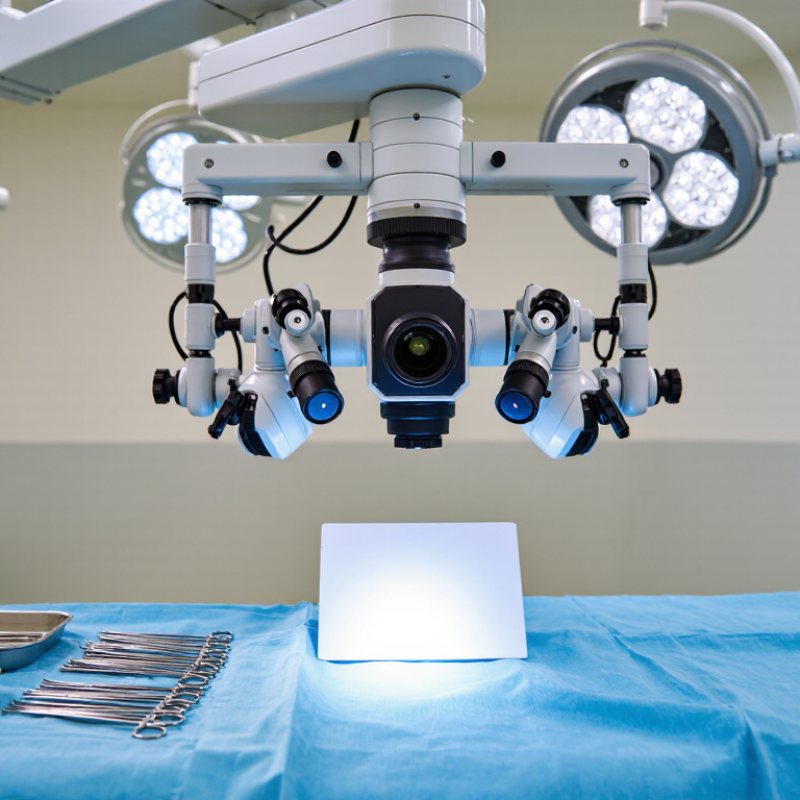
White balance gives a surgical camera a neutral reference for interpreting color under the operating light. Without it, tissue may appear too warm, too cool, or slightly green. That can make subtle color differences harder to judge on the monitor. Light changes.
Calibration works by showing the camera a neutral white or gray target under the same illumination used for the procedure. The camera adjusts its color channels so the target appears neutral rather than tinted. Use a clean, matte target and follow the system’s calibration instructions. Keep the target evenly lit and fill the camera’s view as directed. Avoid glare, shadows, and mixed room lighting, which can distort the reading. Small differences matter.
White balance does not correct focus, exposure, or poor lighting. It also cannot make every tissue color identical across different displays. After calibration, check the image for a neutral-looking target and believable color in the surrounding scene. If the lighting changes, or the camera is moved to a different light source, recalibration may be appropriate. A target can look white to the eye yet still carry a tint the camera detects. That is why visual judgment alone is not always enough. Calibration is a practical reference, not a guarantee; staff should follow local clinical procedures and verify the image before use.
Prepare the camera, display, and light source before adjusting white balance. Let the system reach a stable operating state. Clean the lens and check that the camera head is seated securely. On the display, disable changing picture modes and confirm that brightness and color settings are consistent. A vivid screen setting can make a neutral image look inaccurate. It is easy to overlook this.
Place an approved white reference in the operative view, under the same illumination used for imaging. Keep it flat and evenly lit. Avoid shadows, glare, and colored objects nearby. Fill most of the image with the reference, then start the camera’s white-balance procedure according to its instructions. Review the result on the display. Whites should look neutral, while fine details remain visible. If the image seems slightly tinted, pause and check the lighting and reference placement before repeating calibration. The reference itself may be imperfect.
Tips: Keep the light level steady during calibration. Don’t use ordinary paper; its coatings and color can shift the result. Record the setup conditions if results vary between sessions. Recheck after changing the light source or camera configuration.
Let the camera and light source warm up according to the system’s instructions. Use a clean, matte, neutral-white reference target approved for the equipment. Place it at the working distance, under the same illumination used during imaging. Keep room lights and light intensity stable. Fill the camera view with the target, avoiding shadows, glare, and clipped highlights. Follow the system’s calibration mode to capture the reference and save the result. Small changes matter.
Tips: Keep the target flat and evenly lit. Check that no colored drapes or reflections tint the image. Do not rush. If the calibration fails, inspect the target and lighting before repeating it.
After calibration, view the target and a few familiar colors on the monitor. Whites should look neutral, without a strong blue, green, or amber cast. Check the image at the intended working distance; a result that looks correct on a nearby target may shift under different lighting. Record the settings and any unusual conditions, such as a changed light level. If color remains inconsistent, stop adjusting by eye and consult the equipment instructions or a qualified service professional. A slightly imperfect result can be a useful prompt to recheck the setup.
How to Calibrate White Balance on a Surgical Camera System?
Verifying Color Accuracy and Image Consistency
White balance should be checked under the same lighting conditions used during procedures. Warm up the camera and light source, then place a clean neutral target in the center of the view. Fill the frame evenly, avoiding glare and shadow. Adjust white balance according to the system’s instructions, then capture a reference image. Small shifts matter. CIE 15:2018 specifies the D65 reference illuminant at chromaticity coordinates x = 0.3127 and y = 0.3290. These values provide a colorimetric reference, not a universal setting for every surgical camera or light source. Follow the equipment’s specified workflow.
After adjustment, inspect the target and nearby colors on the clinical display. Neutral areas should appear free of obvious color casts, while reds and pinks should remain distinct rather than washed out. Compare images from the same setup across a session, noting changes in illumination, scope angle, and camera settings. A white card can look correct while tissue colors still drift. That is a limitation worth checking. Record the light level, working distance, target type, and calibration result so another trained operator can repeat the test. If images differ between displays, verify the display settings before changing camera calibration. A quick visual check helps, but it is not a substitute for documented, repeatable assessment.
Verifying Color Accuracy and Image Consistency
Illustrative verification readings from a neutral gray target under stable illumination. After white balance, the captured red, green, and blue values should closely track the reference levels across the tonal range; a small channel spread indicates more consistent neutral color.
Calibration problems often come from the setup, not the camera. Use the neutral reference target specified in the system instructions, and allow the light source to stabilize. Illuminate the target evenly, fill the required reference area, and avoid glare or shadows. Check that the lens and scope are clean and connections are secure. Change one setting at a time. Small changes matter.
If the image stays yellow or blue, confirm the selected light source and camera mode before repeating calibration. A success indicator is useful, but it does not replace a visual check. Compare neutral areas on the approved display. If the result still looks wrong, repeat the process under consistent lighting rather than compensating with unrelated image controls. A reading can pass, yet the image may look off. That mismatch deserves another check.
After a stable result, save the white-balance setting using the system’s approved workflow. Label the profile clearly, and record relevant setup details and the date in the facility log. Keep the established baseline instead of overwriting it casually. Verify that the saved setting remains after standby or restart, as permitted by local procedure. If color drift continues, stop relying on that profile and contact qualified technical support under facility policy.
It gives the camera a neutral color reference under the operating light. Without it, tissue may look warm, cool, or green.
Use a clean, matte, neutral-white or gray target approved for the equipment. Keep it flat and evenly lit.
Place it at the working distance under the same light used for imaging. Fill the camera view as instructed.
Shadows, glare, reflections, and mixed room lighting can distort the reading. Keep light levels stable.
Yes. Follow the equipment instructions before calibrating. Do not rush.
View the target and familiar colors on the monitor. Whites should look neutral, without a strong blue, green, or amber cast.
No. It does not correct focus, exposure, or poor lighting, and it cannot make colors identical across displays.
Recalibrate if the lighting changes or the camera moves to another light source. Check the image at the intended working distance.
Inspect the target and lighting, then repeat the process if appropriate. If the issue persists, consult the equipment instructions or a qualified service professional. A small mismatch may be a useful reminder to recheck the setup.
How to calibrate white balance on a surgical camera system? Begin by understanding that white balance adjusts the camera’s color response so neutral white appears accurate under the operating light. Prepare the camera, display, and a clean, evenly illuminated white reference according to the system’s instructions. Allow the equipment and light source to stabilize, and avoid shadows, glare, or colored objects that could affect the reference.
Activate the white-balance function and position the reference as directed, then complete the calibration and save the setting if required. Verify the result by checking that white looks neutral and that familiar colors appear consistent across the image and display. If the image has a color cast or varies between views, check the lighting, reference placement, connections, and selected camera settings, then repeat the process. Record or preserve a reliable setting so the team can maintain consistent color presentation during subsequent use.

Centuri Medical